Summary
a technique that helps stabilize and speed up the training of deep neural networks by normalizing the input of each layer to have zero mean and unit variance. This normalization helps in stabilizing and accelerating the training process.
BatchNorm ⇒ Normalize by columns (features)
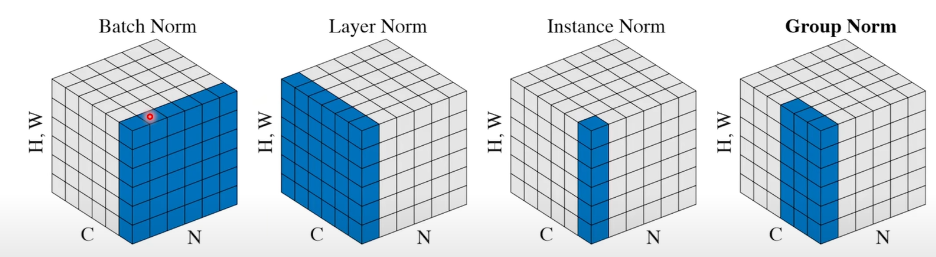
Internal
As data moves through each layer in a deep network, the distribution of inputs changes due to weight updates, a problem called Internal Covariate Shift. This can slow down training because each layer has to constantly adjust to the new input distribution, making it harder to learn effectively.
Important
- Batch normalization addresses this by normalizing the inputs to each layer. For each mini-batch of data during training, BatchNorm standardizes the inputs to have a mean of 0 and a variance of 1. This consistent scale and center mean make it easier for the network to learn and adapt.
- To still allow flexibility, BatchNorm also introduces two learnable parameters, **gamma (scale) and beta (shift).** These parameters help the network learn the best scale and shift for each layer, so if the network needs a different mean or variance, it can learn to adjust accordingly.
Info
For a mini-batch of inputs x, BatchNorm calculates the mean and variance then standardizes each input by: is a small constant to prevent division by zero Normalized value is scaled and shifted:
Success
- Faster Convergence: By keeping activations stable, BatchNorm allows networks to train faster and converge with fewer epochs.
- Higher Learning Rates: With stable inputs, we can use higher learning rates, which can speed up training even further.
- Regularization Effect: BatchNorm has a slight regularizing effect, reducing the need for other regularization techniques like dropout in some cases. This effect comes from the noise introduced by normalizing over a mini-batch rather than the entire dataset.
- better gradient flow through deep networks. This stability is especially useful in very deep networks where training might otherwise suffer from the vanishing/exploding gradient problem.
Implementation Notes: Makes training faster and more stable For convolutional layers: we want different elements of the same feature map to be normalized in the same way. Thus, the normalization is performed per feature map, rather than per activation. For example, for a feature map of size p×q and a mini-batch of size m, m×p×q parameters are normalized in the same way, and there is a single γ, β for these m×p×q parameters. This occurs for both training and inference. Batch normalization adds two trainable parameters γ and β to each layer. These ensure that the expressiveness of the neural network is still constant. Batchnorm goes before the activations, generally Rationale is that you will have your data happily centered around the non-linearity, so you get the most benefit out of it. Imagine your data being all <0, then ReLu will have no effect at all; you normalize it: problem solved. Usually, when you use batchnorm dropout becomes unnecessary (according to one paper, they have the same goals, and when combined lead to worse results). It’s important to make sure that batch sizes are large enough when using bach norm. At test time, we would want the output to depend only on the input, deterministically — not on some “minibatch”. Thus, the means and variances used for normalize in this case are from the entire training set, not just at the minibatch level.
Example PyTorch Code:
import torch
import torch.nn as nn

# Define a simple model with batch normalization
class SimpleModel(nn.Module):
    def __init__(self):
        super(SimpleModel, self).__init__()
        self.conv1 = nn.Conv2d(in_channels=3, out_channels=16, kernel_size=3, padding=1)
        self.bn1 = nn.BatchNorm2d(16)
        self.relu = nn.ReLU()
        self.fc1 = nn.Linear(16*32*32, 10)
        self.bn2 = nn.BatchNorm1d(10)

    def forward(self, x):
        x = self.conv1(x)
        x = self.bn1(x)
        x = self.relu(x)
        x = x.view(x.size(0), -1)
        x = self.fc1(x)
        x = self.bn2(x)
        return x

# Instantiate the model
model = SimpleModel()

# Print the model architecture
print(model)

# Example input tensor (batch size=1, channels=3, height=32, width=32)
input_tensor = torch.randn(1, 3, 32, 32)

# Forward pass through the model
output_tensor = model(input_tensor)
print(output_tensor)